概要
VPSなのでローカルIPがない
公開するのも嫌なので、認証をかけたい
結論
Elasticsearch Authプラグインを利用しようとしたが、別の方法を考えることにした
インストール
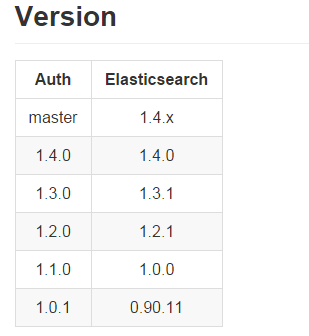
elasticsearchのバージョンが1.0.3なので、authpluginは1.1.0をインストールした
root@hostname:/home/shimizu# cd /usr/share/elasticsearch/bin
root@hostname:/usr/share/elasticsearch/bin# ./elasticsearch -v
Version: 1.0.3, Build: NA/NA, JVM: 1.7.0_79
root@hostname:/usr/share/elasticsearch/bin# ./plugin -install org.codelibs/elasticsearch-auth/1.1.0
-> Installing org.codelibs/elasticsearch-auth/1.1.0...
Trying http://download.elasticsearch.org/org.codelibs/elasticsearch-auth/elasticsearch-auth-1.1.0.zip...
Trying http://search.maven.org/remotecontent?filepath=org/codelibs/elasticsearch-auth/1.1.0/elasticsearch-auth-1.1.0.zip...
Downloading .................DONE
Installed org.codelibs/elasticsearch-auth/1.1.0 into /usr/share/elasticsearch/plugins/auth

root@hostname:/usr/share/elasticsearch/bin# /etc/init.d/elasticsearch restart
[ ok ] Restarting elasticsearch (via systemctl): elasticsearch.service.

### ユーザを作成し、役割をuserとadminにする ###
root@hostname:/usr/share/elasticsearch/bin# curl -XPUT 'localhost:9200/_auth/account' -d "{
    \"authenticator\" : \"index\",
    \"username\" : \"testuser\",
    \"password\" : \"test123\",
    \"roles\" : [\"user\", \"admin\"]
}"
{"status":200}

### /_plugin配下へのGET,POSTメソッドは役割がadminでないと許可しない ###
root@hostname:/usr/share/elasticsearch/plugins# curl -XPOST 'localhost:9200/security/constraint/' -d "{
    \"authenticator\" : \"index\",
    \"paths\" : [\"/_plugin\"],
    \"methods\" : [\"get\", \"post\"],
    \"roles\" : [\"admin\"]
}"
{"_index":"security","_type":"constraint","_id":"oyadKwrdQzWX1koOWG-_lA","_version":1,"created":true}

### Reload Configuration ###
curl -XPOST 'localhost:9200/_auth/reload'
{"status":200}
その結果
/_plugin配下へのアクセスは403を返却するようになった
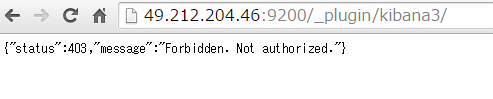
アクセスするために
tokenを発行する
root@hostname:/usr/share/elasticsearch/bin# curl -XPOST 'localhost:9200/login' -d "{
    \"username\" : \"testuser\",
    \"password\" : \"test123\"
}"
{"status":200,"token":"c272c325e88339ac13aa09d1e881905081a53d99512b594cfaba624e7c2394664bb31eb540880e7eca6980e1bb02a76c826cedb3caf32444514ed0169a3e3070"}
tokenをリクエストヘッダー、もしくはクッキー(eaid=…)で渡すことによって
アクセスを許可する仕様とのこと
リクエストURLに以下のtokenを付与すると
/_search?q=*:*&token=(token)
ホワイトアウトしたorz
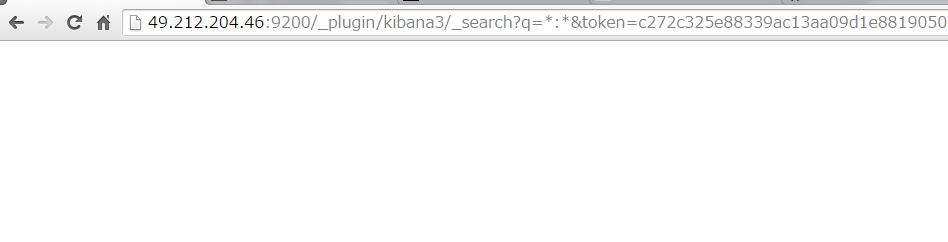
tokenを1文字でも変更すると”Not authorized”となることからpluginは正しく動作している
ただし、/_plugin 配下のため、問題が起こっている模様
(/_plugin/kibana3/ はリダイレクトする)
別の方法を考えたほうがよいかも?
参考
Elasticsearch Authプラグインでアクセスコントロール
elasticsearch-auth
https://github.com/codelibs/elasticsearch-auth