概要
rsyncはlinuxでよく利用されるディレクトリを同期させるコマンド
lsync(Live Syncing Daemon)はリアルタイムで同期ができる(Luaを利用して拡張可能)コマンド
ディレクトリを監視し、ファイルが増えたらそのファイルを送る
hostsyn:sync元のホスト
hosttarget:sync先のホスト
/var/sync: 同期するフォルダ
イメージ:
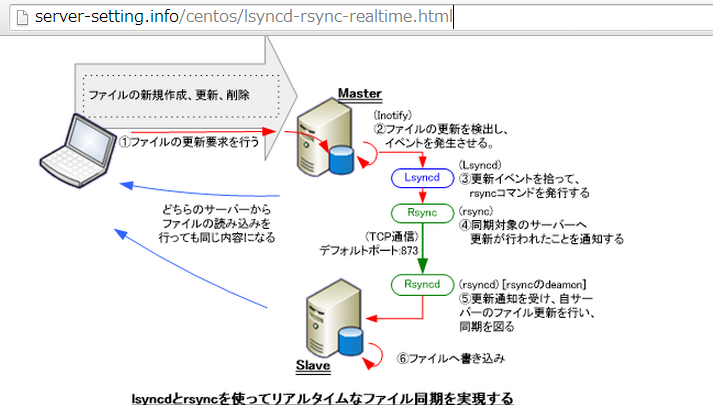
設定-hostsyn-
root@hostsyn:/home/shimizu# aptitude install lsyncd rsync
以下の新規パッケージがインストールされます:
  lsyncd lua5.1{a} rsync
root@hostsyn:/home/shimizu# /etc/init.d/lsyncd start # 反応がないため確認すると
root@hostsyn:/home/shimizu# lv /etc/init.d/lsyncd # config(/etc/lsyncd/lsyncd.conf.lua)がないため、静かに終了していた
root@hostsyn:/home/shimizu# mkdir /etc/lsyncd
root@hostsyn:/home/shimizu# cp /usr/share/doc/lsyncd/examples/lrsync.lua /etc/lsyncd/lsyncd.conf.lua
root@hostsyn:/home/shimizu# vi /etc/lsyncd/lsyncd.conf.lua
=====
----
-- User configuration file for lsyncd.
--
-- Simple example for default rsync.
--
settings = {
        logfile = "/var/log/lsyncd.log",
        statusFile = "/tmp/lsyncd.stat",
        statusInterval = 1,
}

sync{
        default.rsync,
        source="/var/sync/",
        target="(hosttargetのIPアドレス)::lsyncdModule",
}
=====
root@hostsyn:/home/shimizu# /etc/init.d/lsyncd start
root@hostsyn:/home/shimizu# ps afx | grep "[l]sync"
18578 ?        Ss     0:00 /usr/bin/lsyncd -pidfile /var/run/lsyncd.pid /etc/lsyncd/lsyncd.conf.lua
18595 ?        S      0:00  \_ /usr/bin/rsync --delete --ignore-errors -lts -r /var/sync/ 54.178.255.7::lsyncdModule/
デフォルトで完全同期(rsync –delete)する
避けたい場合は、設定ファイルに delete = false を記載する
設定-hosttarget-
root@hosttarget:/home/shimizu# aptitude install rsync
以下の新規パッケージがインストールされます:
  rsync
root@hosttarget:/home/shimizu# vi /etc/default/rsync
=====
RSYNC_ENABLE=true
=====
root@hosttarget:/home/shimizu# /etc/init.d/rsync start
[FAIL] Starting rsync daemon: rsync[....] missing or empty config file /etc/rsyncd.conf ... failed!
 failed!
root@hosttarget:/home/shimizu# cp -p /usr/share/doc/rsync/examples/rsyncd.conf /etc/
root@hosttarget:/home/shimizu# vi /etc/rsyncd.conf
====
uid = root
gid = root

[lsyncdModule]
    path = /var/sync/
    hosts allow = (hostsyncのIPアドレス)
    read only = no
====
root@hosttarget:/home/shimizu# /etc/init.d/rsync start
[ ok ] Starting rsync daemon: rsync.
root@hosttarget:/home/shimizu# netstat -anp | grep "rsync"
tcp        0      0 0.0.0.0:873             0.0.0.0:*               LISTEN      23433/rsync
tcp6       0      0 :::873                  :::*                    LISTEN      23433/rsync
unix  2      [ ]         DGRAM                    70600    23433/rsync
その他設定
同期するファイルが多い場合は設定を変更する
カーネルの inotify が同期するファイルを監視しており、監視するファイル数は設定値による(デフォルト8192)
root@hostsyn:/var/sync# sysctl -a | grep fs.inotify.max_user_watches
fs.inotify.max_user_watches = 8192
root@hostsyn:/var/sync# vi /etc/sysctl.conf
====
fs.inotify.max_user_watches=524288
====
root@hostsyn:/var/sync# sysctl -p
fs.inotify.max_user_watches = 524288
参考URL
lsync公式ドキュメント
https://code.google.com/p/lsyncd/
設定がわかりやすくかかれているサイト
http://www.very-cute.net/wp/lsyncd-rsyncd/
とても詳細までかかれているサイト
http://server-setting.info/centos/lsyncd-rsync-realtime.html
同期のタイミングと注意点
http://www.hiratti.com/server/unix/lsync_rsync_mirroring_caution
・sync先のホストでrenameしたらそのまま残る、削除されたりしない
・sync元のホストで更新したらsync先で上書きされる
・sync先のホストでrenameした後、sync元のホストでそのファイルを更新すると、sync先で新しくファイルが作成される