インストール
LuaはC言語のホストプログラムに組み込まれることを目的に設計されており、高速で動作する
debianでは、nginx-extras もしくは lua-nginx-module を使うと Luaのコードを通してNginxを制御可能
root@hostname:/home/shimizu# aptitude install nginx-extras
(中略)
root@hostname:/home/shimizu# aptitude search nginx | grep ^i
i A nginx-common                    - small, powerful, scalable web/proxy server
i   nginx-extras                    - nginx web/proxy server (extended version)
root@hostname:/home/shimizu# aptitude show nginx-extras | grep Lua
 THIRD PARTY MODULES: Auth PAM, Chunkin, DAV Ext, Echo, Embedded Lua,
root@hostname:/home/shimizu# lv /etc/apt/sources.list # jessie(debian8)のパッケージに存在
=============
deb http://ftp.jp.debian.org/debian/ jessie main contrib non-free
deb-src http://ftp.jp.debian.org/debian/ jessie main contrib non-free

deb http://security.debian.org/ jessie/updates main contrib non-free
deb-src http://security.debian.org/ jessie/updates main contrib non-free

# jessie-updates, previously known as 'volatile'
deb http://ftp.jp.debian.org/debian/ jessie-updates main contrib non-free
deb-src http://ftp.jp.debian.org/debian/ jessie-updates main contrib non-free
=============
root@hostname:/home/shimizu# aptitude install lua-nginx-memcached
...(略)
root@hostname:/home/shimizu# aptitude search nginx | grep ^i
i   lua-nginx-memcached             - Pure Lua memcached client driver for the n
i A nginx-common                    - small, powerful, scalable web/proxy server
i A nginx-extras                    - nginx web/proxy server (extended version)
lua-nginx-memcachedは、OpenRestyをもとにしたパッケージ
OpenRestyは nginx-lua のメンテナの agentzhさんが提供しているバンドル
概要
nginxは [server selection]→[post read]→…→[post action]というフェーズで処理する
LuaはRewrite,Access,Content,Logにてフックする仕組みを提供している
Luaスクリプトからは、ngx.get_phase を利用して、現在のフェーズを取得することができる
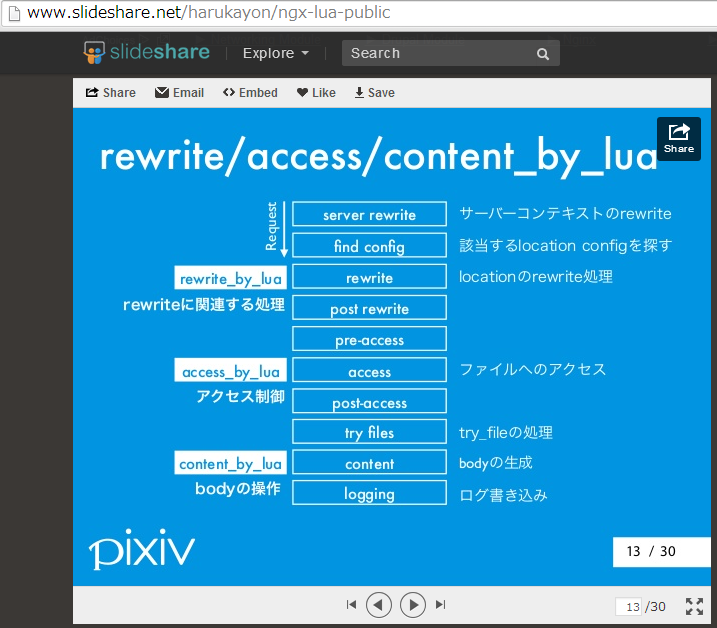
利用方法
rewrite_by_lua
accessフェーズの直前に実行される
つまり以下のコードだと、/barにリダイレクトされ、500エラーは返却されない
location /foo {
        rewrite_by_lua 'ngx.exit(503)';
        rewrite ^ /bar;
}
ちょっと複雑にみえる例
location /foo {
        set $a 12; # create and initialize $a
        set $b ''; # create and initialize $b
        rewrite_by_lua 'ngx.var.b = tonumber(ngx.var.a) + 1';
        if ($b = '13') {
                rewrite ^ /bar redirect;
                break;
        }
        default_type 'text/plain';
        echo "res = $b";
}
別サーバよりアクセスすると、
root@debian:/var/www/htdocs/test# curl http://jpdebian.cloudapp.net/foo
res = 13
となり、/barにリダイレクトされない。これはrewrite_by_luaよりもifが先に実行されるためであり、記載の順番通りに動作しない
リダイレクトさせるためには、以下のように記載する(/barにリダイレクトされ、echoは実行されない)
location /foo {
    set $a 12; # create and initialize $a
    set $b ''; # create and initialize $b
    rewrite_by_lua '
        ngx.var.b = tonumber(ngx.var.a) + 1
        if tonumber(ngx.var.b) == 13 then
            return ngx.redirect("/bar");
        end
    ';

    default_type 'text/plain';
    echo "res = $b";
}
set_by_lua
実行したコードの返り値を、$resに入れる
location / {
   # MIME type determined by default_type:
    default_type 'text/plain';
    set $a "hello";
    set $b "world";
    # inline Lua script
    set_by_lua $res "return ngx.arg[1]..ngx.arg[2]" $a $b;
    echo $res;
}
別サーバよりアクセスすると、
root@debian:/var/www/htdocs/test# curl http://jpdebian.cloudapp.net
helloworld
ngx.say
location / {
        # MIME type determined by default_type:
        default_type 'text/plain';
        content_by_lua "ngx.say('Hello,world!')";
}
別サーバよりアクセスすると、
root@debian:/var/www/htdocs/test# curl http://jpdebian.cloudapp.net
helloworld
リクエストヘッダの内容を取得することも可能
location / {
default_type 'text/plain';
content_by_lua 'ngx.say("Host: ", ngx.req.get_headers()["Host"])';
}
ngx.location.caputure
サブリクエストを飛ばすことが可能
ただし、任意のURLへのリクエストができるわけではなく、nginx 内のインターナルなリクエストしかできない
rewrite_by_lua*, access_by_lua*, content_by_lua* にて利用可能
また返り値は、status, header, body の3つからなるテーブルになっている
location / {
default_type 'text/plain';
content_by_lua '
local res = ngx.location.capture("/auth")
ngx.say("status: ", res.status ," body: ", res.body )
';
}

location /auth {
     internal;
     set $memcached_key abcde;
     memcached_pass 127.0.0.1:11211;
}
別サーバよりアクセスすると、
root@debian:/var/www/htdocs/test# curl http://jpdebian.cloudapp.net
status: 200 body: 1
content_by_lua
body生成処理する
location / {
    # MIME type determined by default_type:
    default_type 'text/plain';

    # try access /?a=hello,world
    content_by_lua "ngx.print(ngx.var['arg_a'], '\\n')";
}
別サーバよりアクセスすると、
root@debian:/var/www/htdocs# curl http://jpdebian.cloudapp.net/?a=hello,world!
hello,world!
ngx.var.(変数)
location / {
        set $value "hoge";
        default_type 'text/plain';
        content_by_lua 'ngx.say(ngx.var.value)';
        }
別サーバよりアクセスすると、
root@debian:/var/www/htdocs# curl http://jpdebian.cloudapp.net
hoge
ngx.var.value だと nginx変数$valueを取得する(ngx.var.uriなどもよく利用される)
この変数はリクエストが終わるたびにメモリから解放されるので、リクエストをまたがって保持したいものは、ngx.shared.DICTを利用する
if
location / {
    # MIME type determined by default_type:
    default_type 'text/plain';

    content_by_lua '
       local num = tonumber(ngx.var.arg_num) or 0

       if num > 50 then
           ngx.say("num too big")
           return
       end

       ngx.say("num is: ", num)

       if num > 0 then
           res = ngx.location.capture("/recur?num=" .. tostring(num - 1))
           ngx.print("status=", res.status, " ")
           ngx.print("body=", res.body)
       else
           ngx.say("end")
       end
       ';
}
別サーバよりアクセスすると、
root@debian:/var/www/htdocs# curl http://jpdebian.cloudapp.net/?num=5
参考
http://wiki.nginx.org/HttpLuaModule
http://d.hatena.ne.jp/hiboma/20120205/1328448746
http://qiita.com/kz_takatsu/items/e94805a8e3cc285f9b33
LUAについて、配列は実装されておらずTableという名の連想配列を利用する
===
local tbl = {miyu=18,sato=25,kumi=20}
ngx.say(tbl[“miyu”])
ngx.say(tbl.sato)
===
ここでngx.say(tbl)などとしてTableを表示させようとすると、以下のエラーで落ちる
coroutine 0:
[C]: in function ‘print’