概要
Node.jsについてやってみた
http://dotinstall.com/lessons/basic_nodejs
特徴
大量のリクエストを高速に処理することが可能(APIやメッセージング部分)
JavaScriptと同じ文法で記載する
イベントループを採用している
イベントループとは
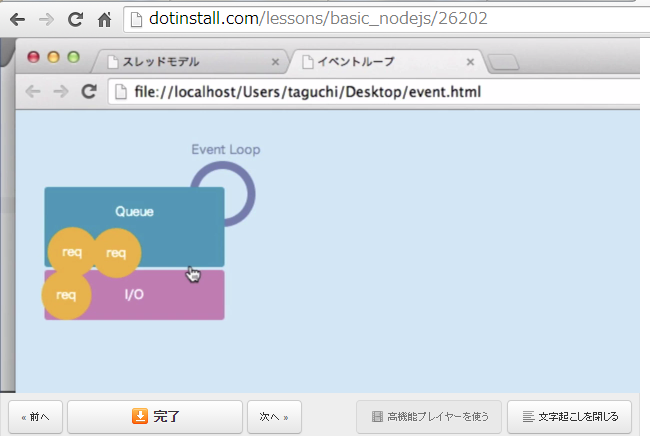
メインスレッド(Queue)とバックグラウンド(I/O)で処理するスレッドが存在
requestはQueueに格納され、EventLoopによって状態を判断後、I/Oによって処理される
そのため、大量のリクエストを受け付けて処理することが可能
デメリットとして
・処理が終わったかわかりにくい
・ループをブロックしないようにしなければならない(ノンブロッキングな書き方→JavaScriptはこの性質を持っている)
インストール
root@shimizu:/home/shimizu#  vi /etc/apt/sources.list
### 以下を追記する ###
deb http://ftp.jp.debian.org/debian/ wheezy-backports main contrib non-free
deb-src http://ftp.jp.debian.org/debian/ wheezy-backports main contrib non-free
######################

root@shimizu:/home/shimizu# aptitude update
...

root@shimizu:/home/shimizu# aptitude install nodejs nodejs-legacy
以下の新規パッケージがインストールされます:
  libc-ares2{a} libv8-3.14.5{a} nodejs nodejs-legacy
更新: 0 個、新規インストール: 4 個、削除: 0 個、保留: 16 個。
2,657 k バイトのアーカイブを取得する必要があります。展開後に 7,425 k バイトのディスク領域が新たに消費されます。
...

root@shimizu:/home/shimizu# nodejs --version
v0.10.29
実行する
コマンドラインで実行
root@shimizu:/home/shimizu/nodejs# node
> console.log("hello world");
hello world
undefined
> .exit
ファイルで実行
root@shimizu:/home/shimizu/nodejs# cat hello.js
console.log("hello world");
root@shimizu:/home/shimizu/nodejs# node hello.js
hello world
ノンブロッキングな処理とは
setTimeoutやDB接続などは次の命令をブロックしないようにかかなければならない
以下は後に書いたworldが先に表示される
root@shimizu:/home/shimizu/nodejs# cat nonblocking.js
setTimeout(function() {
        console.log("hello");
},1000);
console.log("world");
root@shimizu:/home/shimizu/nodejs# node nonblocking.js
world
hello
以下はwhile文が終わるまで次の命令が実行されない、よろしくない
root@shimizu:/home/shimizu/nodejs# cat bloking.js
var start = new Date().getTime();
while (new Date().getTime() < start + 1000);
console.log("world");
root@shimizu:/home/shimizu/nodejs# node bloking.js
world
webサーバを作成する
root@shimizu:/home/shimizu/nodejs# cat server.js
var http = require('http');
var server = http.createServer();
server.on('request', function(req, res){
        res.writeHead(200, {'Content-Type':'text/plain'});
        res.write('hello world');
        res.end();
});
server.listen(9200,'49.212.204.46');
console.log("server listening...")

root@shimizu:/home/shimizu/nodejs# node server.js
server listening...
外部からアクセスすると

root@shimizu:/home/shimizu/nodejs# cat server.js
var http = require('http');
var server = http.createServer();
server.on('request', function(req, res){
        switch (req.url){
                case '/about':
                        msg = "about this page";
                        break;

                case '/profile':
                        msg = "about me";
                        break;

                default:
                        msg = "wrong page";
                        break;
        }
        res.writeHead(200, {'Content-Type':'text/plain'});
        res.write(msg);
        res.end();
});
server.listen(9200,'49.212.204.46');
console.log("server listening...")

root@shimizu:/home/shimizu/nodejs# node server.js
server listening...
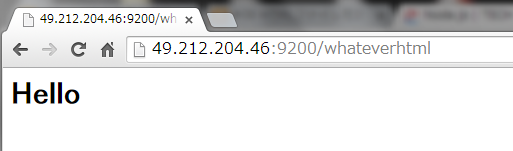
外部からアクセスすると

htmlファイルを読み込む
root@hostname:/home/shimizu/nodejs# cat hello.html
<html>
<h1>Hello</h1>
</html>
root@hostname:/home/shimizu/nodejs# cat server.js
var http = require('http');
        fs = require('fs'); # ファイルシステム用のモジュール
var server = http.createServer();
server.on('request', function(req, res){
        fs.readFile(__dirname + '/hello.html' , 'utf-8' , function(err,data) {
                if (err) {
                        res.writeHead(404, {'Content-Type':'text/plain'});
                        res.write("not found!");
                        return res.end();
                }
        res.writeHead(200, {'Content-Type':'text/html'});
        res.write(data);
        res.end();
        });
});
server.listen(9200,'49.212.204.46');
console.log("server listening...")
npm(node package manager)をインストールする
root@hostname:/home/shimizu/nodejs# curl -L https://npmjs.org/install.sh | sh
  % Total    % Received % Xferd  Average Speed   Time    Time     Time  Current
                                 Dload  Upload   Total   Spent    Left  Speed
100   193  100   193    0     0    277      0 --:--:-- --:--:-- --:--:--   366
100  6239  100  6239    0     0   4722      0  0:00:01  0:00:01 --:--:-- 10610
tar=/bin/tar
version:
tar (GNU tar) 1.26
Copyright (C) 2011 Free Software Foundation, Inc.
使用許諾 GPLv3+: GNU GPL version 3 またはそれ以降 <http://gnu.org/licenses/gpl.html>
This is free software: you are free to change and redistribute it.
There is NO WARRANTY, to the extent permitted by law.

[参考訳]
これはフリーソフトウェアです. 変更と再配布は自由です.
法律で認められる範囲で「無保証」です.

作者: John Gilmore, Jay Fenlason.
install npm@latest
fetching: http://registry.npmjs.org/npm/-/npm-2.1.12.tgz
/usr/bin/npm -> /usr/lib/node_modules/npm/bin/npm-cli.js
npm@2.1.12 /usr/lib/node_modules/npm
It worked

root@hostname:/home/shimizu/nodejs# npm install ejs
ejs@1.0.0 node_modules/ejs
Expressモジュールを利用してみる
Node.jsの軽量、高速なWEBフレームワーク
root@hostname:/home/shimizu/nodejs# npm install express
express@4.10.6 node_modules/express
├── utils-merge@1.0.0
├── merge-descriptors@0.0.2
├── fresh@0.2.4
├── cookie@0.1.2
├── escape-html@1.0.1
├── range-parser@1.0.2
├── cookie-signature@1.0.5
├── finalhandler@0.3.2
├── vary@1.0.0
├── media-typer@0.3.0
├── methods@1.1.0
├── parseurl@1.3.0
├── serve-static@1.7.1
├── content-disposition@0.5.0
├── path-to-regexp@0.1.3
├── depd@1.0.0
├── qs@2.3.3
├── on-finished@2.1.1 (ee-first@1.1.0)
├── debug@2.1.0 (ms@0.6.2)
├── etag@1.5.1 (crc@3.2.1)
├── send@0.10.1 (destroy@1.0.3, ms@0.6.2, mime@1.2.11)
├── proxy-addr@1.0.4 (forwarded@0.1.0, ipaddr.js@0.1.5)
├── accepts@1.1.4 (negotiator@0.4.9, mime-types@2.0.4)
└── type-is@1.5.4 (mime-types@2.0.4)
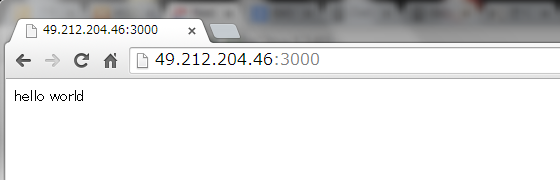
hello world
root@hostname:/home/shimizu/nodejs# cat app.js
var express = require('express')
var app = express()

app.get('/', function(req, res){
        res.send('hello world');
    });

app.listen(3000);
root@hostname:/home/shimizu/nodejs# node app.js
set()メソッドを利用して設定可能
root@hostname:/home/shimizu/nodejs# cat app.js
var express = require('express')
var app = express()
app.set('views','test');
console.log(app)
root@hostname:/home/shimizu/nodejs# node app.js | grep views
     views: 'test',
        views: 'test',
参考URL
http://nodejs.org/
http://dotinstall.com/